Tuesday, February 13, 2007

Release notes … Completed Successfully


Situation

  • You are using Visual Source Safe as a source code repository.
  • Multiple developers in the team, each of them have a set of features/bugs to work on.
  • You have more than one source code repository; for example a development and production.
  • For configuration management purpose; it is required a release notes document for each developer to list the files added/modified/deleted in the source code.

Problem

· Release notes is an error prone task, developers always forget to list some files or take long time to prepare the release notes

· You end up with wasted time for unreliable documents with missing information.


Solution

Automate the release notes creation and let developers focus on coding and debugging, let them live in Visual Studio not in MS Word or Excel

  1. Assign feature/bug set for a developer.
  2. The developer shall start by getting the latest version of the source code stored in the source code repository.
  3. The developer will create a label on VSS before making any modification on any files, for example (Dev-X-YYMMDD-0).
  4. The developer will check-out files, work on his local machine and no files shall be checked-in until he finish all the assigned tasks.
  5. We are not talking about a process, so skip talking about how to make a code review or Check-in polices and so on …
  6. The developer should check-in all the affected files, should add useful information in the check-in comment; for example Feature No. or Bug ID.
  7. Then creates a new label like(Dev-X-YYMMDD-1).
  8. Use VssReporter to get the list of modifications between the two labels [Screen Shot will be here]
  9. Export the list as CSV or XML.

Finally, you have the list of modifications occurred, the CSV file can be used directly from MS Excel or use the XML file to make further reporting like the following ideas:

    • Create an XSLT to produce a fancy report with grouping on the Application/Module level or Solution/Project level.
    • Create an XSLT to produce a batch or script that will pull the affected files into a new folder with the same folder structure to create a Delta package.
    • Create XSLT for any other thing in your mind, you have and XML file that has all the affected files with attributes like when/what and whom.

Credits goes to my colleagues Tarek and Zidan, where we spent nights merging code of 7 developers from 2 sites. We came up with this approach to reduce time in release notes preparation and focus on development.

Sunday, February 11, 2007

Reading Exchange Public Calendar folder using WebDAV

WebDAV is the only choice you have to programmatically access an Exchange Server 2000/2003 public calendar folder, either to read or write.

I ave read about web services support in Exchange 2007, but not yet tested that.


Marc has a great post showing how to access a calendar folder using C# Using .NET and WebDAV to access an Exchange server

Using WebDAV is not easy, you have to compose the proper formatted XML request and then wait to the response and parse it to get the results, when you need to query using dates; which is the case for Calendars you have to use a special format inside the XML request.

I have used a WebDAV wrapper library which was great in hiding those details; it offers wrapping classes like Calendar and Contact with properties and method which carries all the XML stuff for you; the library has samples in both VB.net and C#.

There is one free wrapper; which I didn't use myself ... but the library seems to be updated regularly (http://www.infinitec.de/libraries/exchange/infinitec_exchange_0_99_2.aspx)

The only drawback of using WebDAV is requirement of a new HTTP connection for each request.

When a large number of requests is required (like doing a request for each appointment in a personal calendar folder) you simply exceed the number of outgoing HTTP requests that a server can handle, using .net we get a WebException in this situation because an HTTP request object can't been created.

Monday, January 29, 2007

Get up to speed with AJAX

Microsoft has published the release version of ASP.NET AJAX Extensions 1.0.

To get up to speed; download and view this following 2 videos:

1) http://download.microsoft.com/download/3/c/9/3c9f031b-7e6f-44e6-875e-471fe7b7809c/HDI01-AJAX-B1-GetStarted.zip

2) http://download.microsoft.com/download/3/c/9/3c9f031b-7e6f-44e6-875e-471fe7b7809c/HDI02-AJAX-B1-GetStarted-Toolkit.zip

You will learn what to download and from where, how to install and how to start your first AJAX based website

Friday, January 26, 2007

Clone a DNN instance

I have run across this useful tip, if you have a production DotNetNuke installation, and you want to take it offline for testing or development; then you shall follow some steps to  get it working on localhost after it was configured for production.

Enjoy [http://www.dnncreative.com/Forum/tabid/88/forumid/4/postid/1919/view/topic/Default.aspx]

Tuesday, January 16, 2007

ORA-28009: connection to sys should be as sysdba or sysoper

I got a strange thing here, using SQL Plus as SysDBA is some what different than IMP.

To specify the connection string; you need the following format: username/password@instance as SYSDBA.

For SQL Plus:

This should be wrapped by double quotes "username/password@instance as SYSDBA"

For IMP:

This should be wrapped by single quotes 'username/password@instanceas SYSDBA' ; double quotes will not work.

Wired !

Thursday, January 11, 2007

The Code Room [Episode #3: Security]

Are you ready?

Get your laptop, sharpen your mind, show up your skills, team with geeks and start the challenge

This is the theme of Code Room, another interesting show from Microsoft.

The latest show really rocks, 2 teams; the bad guys trying to hack a web application, and the good guys trying to get them down.

Learning SQL injection, session hijacking , threat analysis basics needs hours of reading and trials, but with this episode of Code Room, those stuff will flow into your mind smoothly and finally you get a good introduction about securing web applications in an interesting way.

Enjoy http://channel9.msdn.com/shows/The_Code_Room

Tuesday, December 26, 2006

u can't connect the dots looking forward, u can only connect them looking backwords

Watch Apple CEO Steve Jobs talking about his story:

http://www.youtube.com/watch?v=xjfRICAisB0

Monday, September 18, 2006

Organize your Settings

The trick that might not been famous, is that we can add multiple settings to a single VS2005 project; this will make organizing settings into groups more useful from a programming point of view or an administration point of view.

Let's say that we have a project with more than 30 entries in its Settings designer, managing this huge number of settings might lead to some errors.

Why not split those settings into groups, for example AdminSettings and OperationSettings.

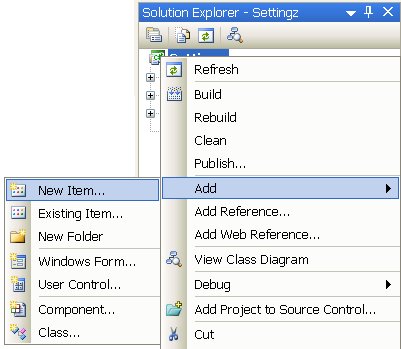
By default a VS2005 project ca have one settings class auto-generated by the settings designer; this class will get the name Settings. We can get rid of this class or leave it and add one or two other by Selecting New Item from the Add menu.


Then we can select the Settings File and name it what ever we want.

We can then use drag and drop to move the newly added settings to the Properties folder


Doing this, we will maintain all settings in the Properties folder,hence to get the name space Properties for all our settings.

Sunday, July 16, 2006

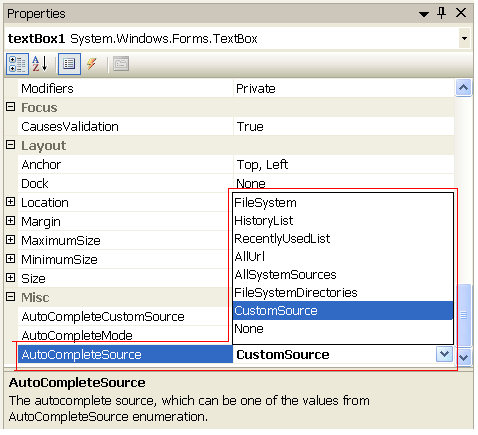
Using the AutoComplete feature in .net 2.0 with a custom source

The .net 2.0 Windows forms TextBox control introduces a new auto complete feature, like that in IE when we try to type a recently visited URL


This feature allow for auto complete of strings from a certain standard sources like File System and IE History List, but it also allow for a custom source to be used as the source of strings to be auto completed


The custom source can be a list of strings added in runtime by setting the AutoCompleteCustomeSource property, or at runtime by setting this property to an AutoCompleteStringCollection instance.

We should set the AutoCompleteSource to CustomSource first and then set the AutoCompleteCustomeSource property.


private void Form1_Load(object sender, EventArgs e)
{

AutoCompleteStringCollection names = new AutoCompleteStringCollection();
names.Add("Apple");
names.Add("Bird");
names.Add("Car");
names.Add("Dog");

textBox1.AutoCompleteSource = AutoCompleteSource.CustomSource;
textBox1.AutoCompleteCustomSource = names;


}

Saturday, July 15, 2006

Viewing Shape files using GoogleEarth

I had some shape files and I wanted to show them on GoogleEarth, I couldn't do this directly as GoogleEarth supports only KML (Keyhole Markup Language) file format.


I thought that it will be easy to convert shape files to KML, and I was right, … thanks to Tim Beermann.


He developed a tool to convert a shape file to KML file, he used completely open-source tools to develop his converter, and also he sharing it freely.


Download Shape2Earth Beta 2


Tuesday, July 04, 2006

Happy new year to me in ITWorx

I am now 1 year old in ITWorx, Am I happy? Or what … here is my feelings

I am happy for:
  • The new people I worked with.
  • The new methodology of development I am getting used to.
  • The new technologies I have learned: .net 2.0 ,VS2005, Third party UI libraries, Windows Services, RSS, SharePoint, Exchange Server WebDAV and CDO development, Telephony APIs, Remoting , MSMQ , XSLT, Unit Testing, Build management …
  • ITWorx itself :I am more than happy and proud of myself joing it,why not and others name it Most Exciting Company
    http://www.businesstodayegypt.com/article.aspx?ArticleID=4967

While I have some other feelings because:

  • Working in a large company exposes you to a wide competition: who you are in 400+ employees!!
  • Working in dynamic projects with fast moving feature set and adaptation to more and more new technologies put you in a stress: running for new information, learning very fast, how to decide if you need to scratch the surface of a topic or go deeply into details.
  • Being in situations which not only your technical level that decide your career future; it is your personality, your skills in communicating with people, your ability to show up your self and being able to negotiate and debate.

    More feelings coming soon …

Friday, June 23, 2006

[DotNetNuke] : Conusme your own RSS feeds

DotNetNuke has the ability to generate RSS feeds for many of its modules, just by enabling the Syndication option in the module settings, although this will not guarantee that the RSS feeds will not be up-to-date. [*]

Those feeds are important for many users who will be interested to get updates only without visit your site regularly.

RSS feeds can be useful for the site itself; in situations when you need to show the same information with different views, for example; an announcement module show its contents in a list, but doesn’t show the headlines as a marquee.

One solution is to consume the RSS feeds generated by the announcement module, and transform it into a marquee using a simple XSLT template, thanks to the XML/XSL module.

So, you are consuming your own feeds to show a piece of information into different views without the need to develop new modules.


Note: RSS feeds are not up-to-date.

I have faced the problem of RSS feeds are not uptodate,or not generated completely , but I have found a solution on dotNetNuke forums. I am not sure which of the following steps are the real cause of the problem, I have done them all.


  • The Page that host the module should be View ALL for Users
  • The module : should allow syndication, has no expiration date [not just set to 9999]
  • The Re-index command from Host\Search Admin ; should be called after you place the module on the page
  • The following task should be running and enabled :
    - DotNetNuke.Services.Cache.PurgeCache, DOTNETNUKE
    - D
    otNetNuke.Services.Search.SearchEngineScheduler, DOTNETNUKE
DotNetNuke Forum post

Wednesday, January 25, 2006

A VS2005 macro to measure the length of string laterals in the code editor

The following macro, is a Visual Studio macro to measure the length of string laterals in the code editor.

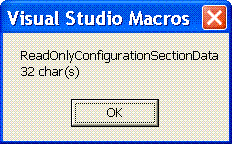
Highlight the string and run the macro, a message box will show the length

Sub MeasureStringLength()
Dim ts AsTextSelection = DTE.ActiveDocument.Selection
Dim msg As String
msg = String.Format("{0}{1}{2} char(s)", ts.Text, ,vbCrLf ts.Text.Length)

MsgBox(msg)

End Sub

How to use
1. Select a string in the Code Editor


2.Run the Macro


3.See the Msessage Box with the length


It is also easy to assign the macro to a custome toolbar button in VS2005, or give it a Keyboard short cut

Tuesday, January 17, 2006

RTF to HTML using C#

I have searched for a code snippet or an (.net) open source utility to convert an RTF string into an HTML string

Many stuff are there, but all has some limitations to what I need exactly.

Here is some of the search result

ExRichtextBox with lite HTML
http://www.codeproject.com/cs/miscctrl/htmlrichtextbox.asp

Use IRichEditOle from C#
http://www.codeproject.com/cs/miscctrl/richtextboxplus.asp

Insert Plain Text and Images into RichTextBox at Runtime
http://www.codeproject.com/cs/miscctrl/csexrichtextbox.asp

AutoFormatter
http://blogs.vbcity.com/hotdog/archive/2004/09/11/280.aspx?Pending=true

The HtmlEditor - a C# control that wraps MSHTML
http://www.itwriting.com/htmleditor/index.php

MSWord Automation Converting RTF to TXT format
http://www.codeproject.com/csharp/rtftotxtconvertor.asp#xx1196725xx

Copy as Html (VS Add-in)
http://www.jtleigh.com/people/colin/software/CopySourceAsHtml/

VB.net function to convert rtf to html
http://www.developer.com/net/vb/article.php/10926_1576561_3

Sunday, November 20, 2005

Consume a Web service using VB6 ... Long Life VB6

I was a VB6 developer, and it seems that I will remain for a while even that the major of my work is in C#.

A friend of mine has asked me how to consume a web service using VB6.

I have seen a sample before about using the SOAP Client installed in WinXP and above to call a web service.

Soap Client is a COM component, so it can be used easily in VB6.

So, I opened VS.net and write a simple web service that Add 2 numbers and return the result.

And, amazingly it is very easy to get this job done in VB6. Just a new object of SOAP Cleint and give it the WSDL URL.

Forget the intillesense and call the method and assign the result in a variable.

The problems are coming.

My friend asked: "Is it possible to return a record set from a web service?"
Hmmm …

Things have been tough, I added a new mrthod to the simple web service that return a DataSet. I have expected that SOAP Client will not be able to parse it and just the return may be a string with the XML serialization of the DataSet.

But; this was not right. I have tested the type of the result :

Debug.Print TypeName ( soapClient.GetEmployees )

And the result was of type IXMLDOMNodeList.

Waw !!!

Then we have an instance of an XML object thatwe can traverse its child nodes searching for the value(s) we are searching for.

This is a tough job.

Examining the XML representation of a DataSet, gives a bad feeling … What is the heck this is needed for , Why not just consume that web service using .net !!


It is doable, but is not funny …

Wednesday, July 20, 2005

SNMP4J - Free Open Source SNMP API for Java

Today I have found SNMP4J - Free Open Source SNMP API for Java ;It looks to be more professional than I had used before

It includes a nice feature [Row-based efficient asynchronous table retrieval with GETBULK] ... so my SnmpGetRow class -that I have inspired its implementation from SnmpWalk- will be of no use any more.

I hope that I will be able to port CLNM to use SNMP4J instead of JoeSnmp

(*) AdventNet Simulation Toolkit help to test SNMP based applications with out a real SNMP Agent.

Monday, July 18, 2005

Unit Testing

How many times we have to develop some sort of applications like a Console or Forms applications to test a class library.

Unit testing is a standard way of testing; .net code can be tested using nUnit

nUnit is a tool that runs the tests you create and show the result is avery organized way.

TestDriven.NET is a tool that enable runnig the tests from within Visual Studio

Read the tutorial on nUnit web site ;it is a fast start

Sunday, July 10, 2005

New Job ( 1st Week passed )


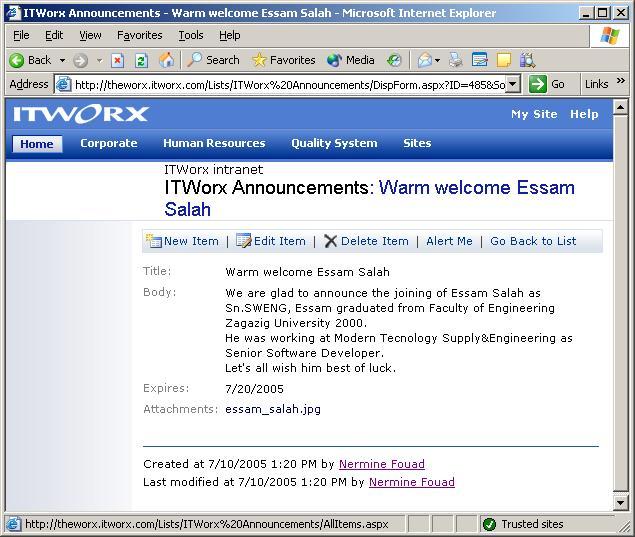
One week passed since I joined ITWorx; the last week was full of training and meetings and today I have been announced on the company intranet as a senior software engineer (Sn.SWENG)

I will start my tasks beginning from tomorrow in a distributed .net application.

Wish( Me.BestWishes( ) )

Tuesday, July 05, 2005

Eclipse Eclipse ... What is going on

Eclipse the IBM initiated open source development IDE and framework has been now in version 3.1
The open source nature acquires tool developers to create plug-ins for GUI building and UML modeling and more

Even major players in development tools are saying that they will use Eclipse as the framework to build the next generation development tools instead of their own technology:_
Borland JBuilder -> Borland Announces JBuilder® Product Roadmap
Macromedia -> Macromedia aligns with Eclipse

another nice open-source project is EasyEclipse which packs many open-source tools and plug-ins along with Eclipse as one package

Sunday, July 03, 2005

New Job

Today I have started my new job; Software Engineer in ITWorx
I have met my team members, given a brief about the project I am going to join, and assigned a place to work

I have given a nice email esam.salah@itworx.com and assigned some technologies to start reading and practicing (SPS, .net Remoting, COM+, MSMQ )

I hope I will be good to know all of this in just a week